⚡ Create and Maintain Partitioning for Scalable SQL Performance
Partitioning is the process of dividing a large table or index into smaller, more manageable subsets (partitions) , while still treating them as a single tab...
⚡ Create and Maintain Partitioning for Scalable SQL Performance
What is Partitioning in Databases?
Partitioningis the process of dividing a large table or index into smaller, more manageablesubsets (partitions), while still treating them as a single table in queries. This boosts query performance, simplifies maintenance, and improves scalability — especially in large datasets.
🚀 Why Use Partitioning?
✅ Faster Query Performance
Instead of scanning the entire table, the database can access only therelevant partition, reducing I/O and improving speed.
✅ Easier Maintenance
Operations like purging old data, archiving, or reorganizing become simpler when applied to specific partitions.
✅ Better Resource Utilization
Partitioning helps distribute data across different storage or servers (in distributed databases), optimizing performance and reducing contention.
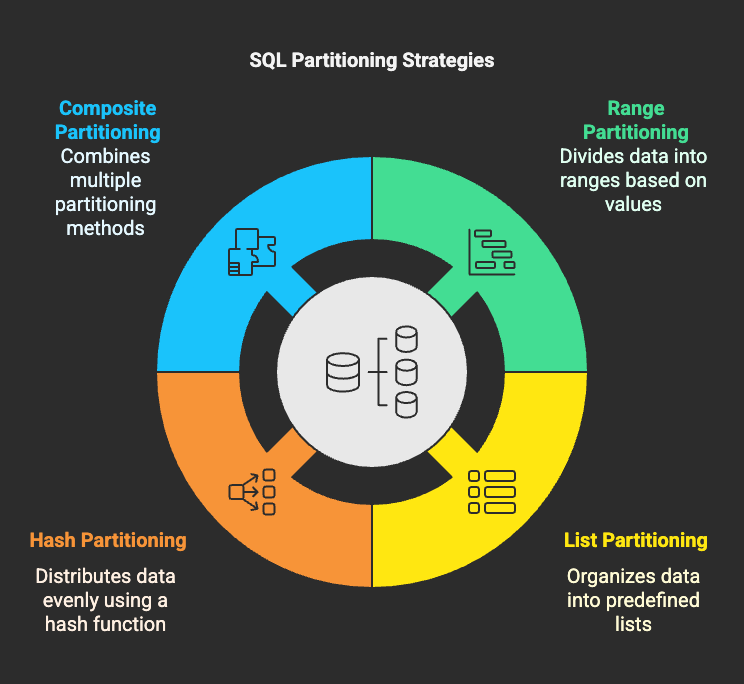
🧩 Types of Partitioning
💡 Example: Range Partitioning (PostgreSQL)
Let’s partition a sales table by year.
-- Parent tableCREATE TABLE sales ( id SERIAL, sale_date DATE, amount DECIMAL) PARTITION BY RANGE (sale_date);-- Child partitionsCREATE TABLE sales_2022 PARTITION OF sales FOR VALUES FROM ('2022-01-01') TO ('2023-01-01');CREATE TABLE sales_2023 PARTITION OF sales FOR VALUES FROM ('2023-01-01') TO ('2024-01-01');
Now when you query:
SELECT * FROM sales WHERE sale_date BETWEEN '2023-03-01' AND '2023-03-31';
Only sales_2023 is scanned — not the entire table.
⚙️ Maintaining Partitions
Partitioning isn’t a one-time job — it needs upkeep.
✅ 1. Add New Partitions Ahead of Time
For time-based data, create new partitionsbefore the current ones expire.
CREATE TABLE sales_2024 PARTITION OF sales FOR VALUES FROM ('2024-01-01') TO ('2025-01-01');
✅ 2. Drop Old Partitions to Purge Data
Instead of deleting millions of rows, just drop a partition.
DROP TABLE sales_2022;
Much faster and avoids transaction logs!
✅ 3. Monitor Partition Size & Balance
Avoid skewed partitions (where one is significantly larger than others), especially in hash/list partitioning.
🧠 When to Use Partitioning
Use partitioning when:
- You deal withvery large tables(millions of rows).
- Your queries often filter onpartitioning key(e.g., date).
- You needfast archivalordata purging.
- You want todistributedata for load balancing or parallel processing.
⚠️ Things to Watch Out For
- Don’t over-partition — too many small partitions can degrade performance.
- Make sure partition pruning works (use EXPLAIN to verify).
- Indexes must be created per partition unless using global indexes (depends on DBMS).
🏁 Conclusion
Partitioning is apowerful techniquefor improving the performance and manageability of large datasets. When done right, it:
- Speeds up queries,
- Simplifies maintenance,
- And scales with your application.
Use it when your data starts growing beyond millions of rows and becomes a bottleneck. Combined with indexing and good schema design, it becomes a cornerstone of high-performance SQL.