🧵 Thread Lifecycle & Management — The Final Pillar
Welcome to Pillar 9 of the Concurrency & Multithreading: The Ultimate Engineer’s Bible series.
🧵 Thread Lifecycle & Management — The Final Pillar
Welcome to Pillar #9 of theConcurrency & Multithreading: The Ultimate Engineer’s Bibleseries.
🔗← Previous: Parallelism• 🔗 [→ Next (TBA)]
🔝Parent Blog: The Ultimate Concurrency & Multithreading Guide
✅ Read for free:Thread Lifecycle & Management — The Final Pillar
If it helped you, clap once. If it helped a lot, clap more. That’s how it reaches others too.
🧠 Think Like an OS
Threads are not just abstractions; they are contracts with the OS scheduler. Understanding their lifecycle makes you a better performance engineer, not just a better programmer. This is not optional knowledge — it’s foundational.
🔁 Thread Lifecycle
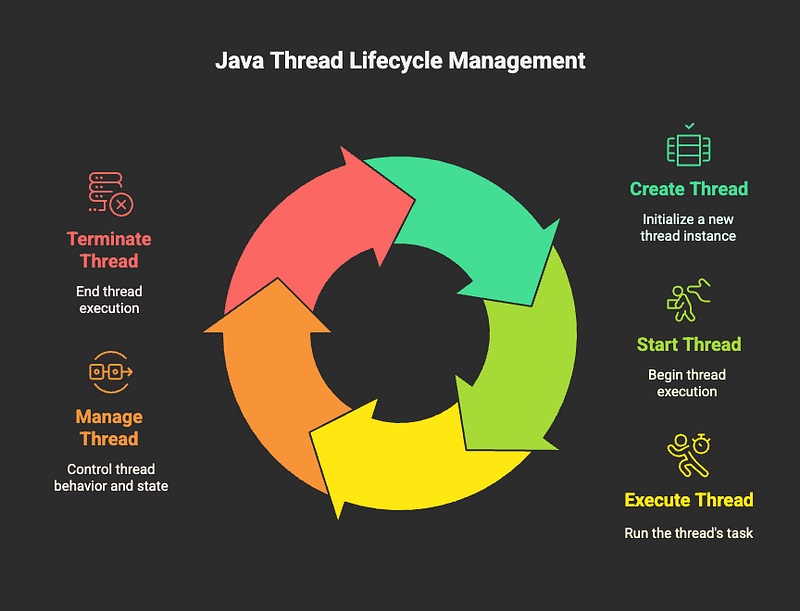
Every thread in Java goes through a predictable journey with 6 well-defined states. Think of it like tracking a package delivery — you always know exactly where it is in the process.
The 6 States:
- NEW— Thread object created, but
.start()hasn’t been called yet - RUNNABLE— Thread is ready to run or currently running (JVM handles the details)
- BLOCKED— Thread is stuck waiting to enter a
synchronizedblock/method - WAITING— Thread is waiting indefinitely for something (like
.join()or.wait()) - TIMED_WAITING— Thread is waiting, but with a timeout (like
.sleep(1000)) - TERMINATED— Thread finished executing (successfully or with exception)
🧘♂️ Analogy: Think of a person at a subway station
- NEW: Person bought a ticket but hasn’t entered the station
- RUNNABLE: Person is on the platform, ready to board or currently on a train
- BLOCKED: Person is stuck behind a crowd at a turnstile
- WAITING: Person is sitting on a bench, waiting for their friend to arrive
- TIMED_WAITING: Person is waiting for the 3:15 PM train specifically
- TERMINATED: Person reached their destination and left the station
🔍 State Demo Code
Thread t = new Thread(() -> { try { Thread.sleep(1000); // This will be TIMED_WAITING } catch (InterruptedException e) { // Handle interruption gracefully }});System.out.println(t.getState()); // NEW - thread created but not startedt.start();System.out.println(t.getState()); // RUNNABLE or TIMED_WAITING (depending on timing)
Pro Tip: You can check thread state anytime with.getState()- super useful for debugging!
👷 Creating and Running Threads
Traditional Way
Thread t = new Thread(() -> { System.out.println("Running in " + Thread.currentThread().getName());});t.start(); // Creates new thread - runs concurrently
With Runnable or Callable
The preferred approach — separates the task from thread management:
// Define what to doRunnable task = () -> doSomething();// Option 1: Manual thread creationnew Thread(task).start();// Option 2: Use an executor (recommended)ExecutorService exec = Executors.newFixedThreadPool(2);exec.submit(task); // Let the pool manage threads
Why use ExecutorService?It handles thread creation, reuse, and cleanup automatically. You focus on the work, not the plumbing.
🧰 Managing Threads
🔹 start() vs run() — The Rookie Mistake
This is probably the #1 thread mistake beginners make:
Thread t = new Thread(() -> System.out.println("Hello"));t.start(); // ✅ Creates NEW thread, runs concurrentlyt.run(); // ❌ Just calls method in CURRENT thread - no concurrency!
Think of it like this:
start()= “Go hire someone else to do this work”run()= “I’ll do this work myself right now”
🛑Never callrun()directly unless you know what you’re doing.
🔹 interrupt() and isInterrupted() — The Polite Way to Stop
You can’t force-kill a thread in Java (for good security reasons). Instead, you ask it nicely to stop:
Thread t = new Thread(() -> { while (!Thread.currentThread().isInterrupted()) { // Do work... // Thread checks if it should stop } System.out.println("Thread stopping gracefully");});t.start();Thread.sleep(5000); // Let it work for 5 secondst.interrupt(); // "Hey, please stop when you can"
Key Point: The thread must checkisInterrupted()itself. It’s cooperative, not forced.
Common Pattern for Blocking Operations:
try { Thread.sleep(1000);} catch (InterruptedException e) { // Someone asked us to stop Thread.currentThread().interrupt(); // Restore interrupt status return; // Exit gracefully}
🔹 setDaemon(true) — Background Workers
Daemon threads are like background music — they die when the main party (your application) ends.
Thread backgroundWorker = new Thread(() -> { while (true) { cleanupOldFiles(); // This runs forever Thread.sleep(60000); // Every minute }});backgroundWorker.setDaemon(true); // Dies when main thread diesbackgroundWorker.start();
Perfect for:
- Cleanup tasks
- Monitoring/heartbeat threads
- Background data processing
Important: Must callsetDaemon(true)BEFOREstart()!
🔹 setPriority(int) — The Unreliable Hint
You can suggest thread priority (1–10), but it’s just a suggestion:
t.setPriority(Thread.MAX_PRIORITY); // "Pretty please, run me first"
Reality Check: The JVM and OS may completely ignore this. Don’t build logic that depends on thread priority — it’s not portable or reliable.
Use rarely. Don’t rely on this for correctness.
🧭 ThreadFactory — Professional Thread Creation
Instead of creating raw threads, useThreadFactoryto standardize thread creation across your application:
ThreadFactory namedFactory = runnable -> { Thread t = new Thread(runnable); t.setName("worker-thread-" + UUID.randomUUID()); t.setDaemon(false); // Explicit is better than implicit return t;};// Use with executorsExecutorService exec = Executors.newFixedThreadPool(4, namedFactory);
Benefits:
- Consistent naming for debugging
- Standardized daemon/priority settings
- Easy to add logging or monitoring
- Professional code organization
🏚️ ThreadGroup (Legacy)
Thread groups exist but are basically deprecated. They were supposed to manage groups of threads but turned out to be limited and buggy.
Modern Alternative: UseExecutorServiceor custom thread pools for better control.
Click to read more about →ExecutorService.
Still exists for backward compatibility, but almost never needed in modern Java applications.
💥 Common Pitfalls & How to Avoid Them
❌ The Classic Mistakes:
1. Forgetting to call start()
Thread t = new Thread(task);// Oops! Thread never runs - still in NEW state
2. Using run() instead of start()
Thread t = new Thread(task);t.run(); // No concurrency - runs in current thread
3. Ignoring InterruptedException
try { Thread.sleep(1000);} catch (InterruptedException e) { // DON'T ignore this! It breaks shutdown logic}
4. Leaking threads (no shutdown)
ExecutorService exec = Executors.newFixedThreadPool(10);exec.submit(task);// App never shuts down properly - threads keep it alive!
🔁 Graceful Shutdown — The Professional Touch
Always clean up your thread pools properly:
ExecutorService exec = Executors.newFixedThreadPool(4);// Do your work...exec.submit(tasks);// Shutdown gracefullyexec.shutdown(); // No new tasks, finish current onestry { // Wait up to 10 seconds for completion if (!exec.awaitTermination(10, TimeUnit.SECONDS)) { exec.shutdownNow(); // Force shutdown if taking too long }} catch (InterruptedException e) { exec.shutdownNow();}
Why this matters: Without proper shutdown, your application might hang indefinitely or not exit cleanly.
🧠 Final Analogy: Thread Lifecycle as a Movie Actor
- NEW: Actor is cast but hasn’t arrived on set
- RUNNABLE: Actor is on set, ready for their scene or currently acting
- BLOCKED: Actor is waiting outside the makeup trailer (someone else is using it)
- WAITING: Actor is in their dressing room, waiting for the director to call them
- TIMED_WAITING: Actor is taking a 15-minute break before their next scene
- TERMINATED: Actor finished their scenes and went home
Understanding this model is what separates script kiddies from true JVM monks.
🤔 Common Questions & Interview Deep-Dive
1. Why can’t I just kill a thread forcefully?
Short Answer: Security and safety.
Long Answer: Imagine forcefully stopping someone mid-sentence while they’re updating a bank account. The account could end up in an inconsistent state. Java’s cooperative interruption model ensures threads can clean up properly before stopping.
2. What happens if I call start() twice?
Thread t = new Thread(task);t.start();t.start(); // IllegalThreadStateException!
Once a thread is TERMINATED, it can never be restarted. You need to create a new Thread object.
3. How many threads should I create?
Rule of thumb:
- CPU-bound tasks: Number of cores (4 cores = 4 threads)
- I/O-bound tasks: More threads (maybe 2–4x cores) since threads will be waiting
- Mixed workloads: Start with core count, then measure and adjust
Never create hundreds of threads— context switching overhead will kill performance.
4. What’s the difference between shutdown() and shutdownNow()?
- shutdown(): “Finish your current work, but don’t accept new tasks” (polite)
- shutdownNow(): “Stop what you’re doing right now” (urgent)
shutdownNow()sends interrupt signals to all running threads, but they still need to checkisInterrupted()to actually stop.
5. Can daemon threads prevent JVM shutdown?
Nope!That’s their whole point. When all non-daemon threads finish, the JVM exits immediately, even if daemon threads are still running.
Regular threads: Keep JVM aliveDaemon threads: Die with the JVM
6. How do I debug thread issues?
Essential techniques:
- Thread names: Always name your threads for easier debugging
- Thread dumps:
jstack <pid>orkill -3 <pid>on Unix - Logging: Add thread names to log statements
- IDE debuggers: Most IDEs show thread states and stacks
- JConsole/VisualVM: Visual thread monitoring tools
🔚 Final Words of the Series
You now possessThe 9 Pillars of Concurrency:
- Mutual exclusion— Protecting shared resources.
- Visibility— Ensuring changes are seen across threads.
- Atomicity— Making operations indivisible.
- Coordination— Synchronizing thread interactions.
- Task management— Organizing and executing work.
- Non-blocking async— Building responsive systems.
- Immutability— Eliminating shared mutable state.
- Parallelism— Exploiting multiple cores effectively.
- Thread lifecycle— Managing thread creation to termination.
From here on, every line of multithreaded code you write will carry intention and precision.
We’re not done. We’re just getting started.
🧭 Series Navigation
🛠️ Show Your Support
If this post brought you clarity, saved you hours of Googling, or challenged the way you think:
- 👏Clapto support the effort (you can hit it up to 50 times on Medium).
- 🔁Shareit with a fellow engineer or curious mind.
- 💬Commentwith questions, feedback, or requests — I read every one.
- 📩Requesta topic you’d like covered next.
- ⭐Followto stay ahead as new deep-dive posts drop.