🧮 Parallelism — Exploiting All Cores Like a Pro
Welcome to Pillar 8 of the Concurrency & Multithreading: The Ultimate Engineer’s Bible series.
🧮 Parallelism — Exploiting All Cores Like a Pro
Welcome to Pillar #8 of theConcurrency & Multithreading: The Ultimate Engineer’s Bibleseries.
🔗← Previous: Immutability• 🔗 →Next: Thread Lifecycle & Management*
🔝*Parent Blog: The Ultimate Concurrency & Multithreading Guide
✅ Read for free:Parallelism — Exploiting All Cores Like a Pro
If it helped you, clap once. If it helped a lot, clap more. That’s how it reaches others too.
🧠 Imagine This:
You’ve got 16 cores.
You run a program that uses only one.
You’re wasting 93.75% of your machine.
Parallelism is about doing multiple things at the same time — not just having threads, but designing your logic to actually split and conquer.
Let’s break down how to unleash this in Java.
🧘 Analogy: Cutting Vegetables at a Party
Concurrencyis one knife being passed around — people take turns.Parallelismis 4 people each with their own knife, cutting different vegetables at the same time.
This is not about sharing. This is about dividing and conquering.
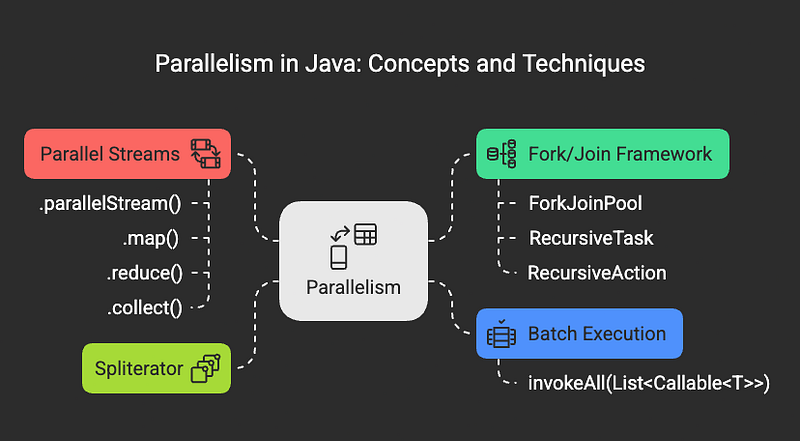
🔨 Fork/Join Framework
Think of this as Java’s built-in “divide and conquer” toolkit. Imagine you have a massive pile of work — instead of doing it all yourself, you break it into smaller chunks, give each chunk to a different worker, and then combine all their results at the end.
This is exactly what Fork/Join does:
- Fork= “Hey, go work on this piece separately”
- Join= “Wait for everyone to finish, then combine results”
🧱 Core Components
- ForkJoinPool— Think of this as your team manager who assigns work to available workers
- **RecursiveTask
**— A job that breaks itself into smaller jobs AND returns a result (like calculating a sum) - RecursiveAction— A job that breaks itself into smaller jobs but doesn’t return anything (like updating a database)
The “Recursive” part means the task can keep breaking itself down until the pieces are small enough to handle easily.
✅ Example: Sum of Array Using Fork/Join
Let’s say you want to add up all numbers in a huge array. Instead of going through each number one by one, you can:
- Split the array in half
- Calculate the sum of each half separately (in parallel)
- Add those two sums together
public class ArraySumTask extends RecursiveTask<Long> { private final long[] array; private final int start, end; private static final int THRESHOLD = 1000; // If chunk is smaller than this, just do it directly public ArraySumTask(long[] array, int start, int end) { this.array = array; this.start = start; this.end = end; } @Override protected Long compute() { if (end - start <= THRESHOLD) { // Small enough - just calculate directly long sum = 0; for (int i = start; i < end; i++) sum += array[i]; return sum; } else { // Too big - split it in half int mid = (start + end) / 2; ArraySumTask left = new ArraySumTask(array, start, mid); ArraySumTask right = new ArraySumTask(array, mid, end); left.fork(); // Send left half to another thread long rightResult = right.compute(); // Calculate right half on current thread long leftResult = left.join(); // Wait for left half to finish return leftResult + rightResult; } }}
🔌 Usage:
ForkJoinPool pool = new ForkJoinPool();long sum = pool.invoke(new ArraySumTask(array, 0, array.length));
The beauty? If you have 8 cores, this task can theoretically run 8 times faster than the single-threaded version!
🚀 Parallel Streams
This is theeasiestway to add parallelism to your Java code. It’s like having a magic.parallel()button that makes your data processing faster.
List<Integer> numbers = List.of(1, 2, 3, 4, 5);int sum = numbers.parallelStream() // Make it parallel .mapToInt(i -> i * 2) // Double each number .sum(); // Add them all up
What happens behind the scenes? Java automatically:
- Splits your list into chunks
- Processes each chunk on different cores
- Combines the results
- Uses the same ForkJoinPool we talked about above!
⚠️ Important Gotchas:
- Only use for CPU-heavy work: If you’re just reading files or making web requests, parallelism won’t help much
- Need enough data: Parallel processing has overhead. For tiny lists (like 10 items), it’s actually slower!
- Think big: Works best with hundreds or thousands of items
🧩 The Safe Operations: .map(), .reduce(), .collect()
These stream operations work great in parallel, but only if you follow the golden rule:don’t mess with shared data.
// ✅ SAFE - each operation is independentint total = numbers.parallelStream() .map(i -> i * i) // Square each number .reduce(0, Integer::sum); // Add them up// ❌ DANGEROUS - multiple threads writing to same variableint badCounter = 0;numbers.parallelStream() .forEach(i -> badCounter++); // Multiple threads might update at once!
Think of it like this: if 4 people are working on different parts of a puzzle, they’re fine. But if they’re all trying to write on the same piece of paper at once, chaos ensues.
🔍 Spliterator (Advanced Topic)
This is the engine that decides how to split your data for parallel processing. You probably won’t need to create custom ones, but it’s good to know they exist. Think of it as the “smart slicer” that knows the best way to cut up your specific type of data.
🔁 Batch Execution with invokeAll
Sometimes you have a bunch of completely separate tasks that can all run at the same time.invokeAllis perfect for this - it’s like saying “go do all these things, and let me know when they’re ALL done.”
ExecutorService pool = Executors.newFixedThreadPool(4);List<Callable<String>> tasks = List.of( () -> "Process file A", () -> "Process file B", () -> "Process file C");List<Future<String>> results = pool.invokeAll(tasks);
Perfect for scenarios like:
- Processing multiple files
- Making several API calls
- Running different calculations
⚖️ Parallelism vs Concurrency (The Key Difference)
This is where many people get confused. Let me clear it up:
Concurrency= Managing multiple things that need to happen (like a juggler keeping multiple balls in the air)Parallelism= Actually doing multiple things simultaneously (like having multiple jugglers each handling their own balls)
- Concurrencyis about dealing with a lot of things at once
- Parallelismis about doing a lot of things at once
You can have concurrency without parallelism (one core handling multiple tasks by switching between them), but parallelism requires multiple cores actually working simultaneously.
🔍 Real-World Scenario: Image Processing
Here’s where parallelism really shines. Imagine you run a website and need to resize 1000 user-uploaded photos:
Old way (sequential):
- Resize photo 1 (2 seconds)
- Resize photo 2 (2 seconds)
- …continue for all 1000 photos
- Total time: 33+ minutes
Parallel way:
- Split photos into 8 groups (you have 8 cores)
- Each core resizes ~125 photos simultaneously
- Total time: ~4 minutes
The work didn’t change — you just organized it better. That’s the power of parallelism.
🤔 Common Questions & Interview Deep-Dive
How is ForkJoinPool different from ThreadPoolExecutor?
ThreadPoolExecutoris like a restaurant with a fixed number of waiters — each waiter handles one customer at a time, start to finish.
ForkJoinPoolis like a kitchen with sous chefs — if a chef gets a big task (like preparing 100 steaks), they can break it down and get help from idle chefs, then combine the results.
Key Differences:
- ThreadPoolExecutor: Fixed threads, each handles one complete task
- ForkJoinPool: Dynamic work-stealing, threads can help each other
- Use ThreadPoolExecutor for: Independent tasks (web requests, file processing)
- Use ForkJoinPool for: Recursive, dividable tasks (calculations, tree traversals)
What’s this ‘work-stealing’ everyone talks about?
Imagine 4 threads working on different parts of a calculation:
- Thread A finishes its chunk early
- Thread B is still working and has a big queue
- Thread A “steals” some work from Thread B’s queue
- Result: Better CPU utilization, faster completion
This happens automatically — you don’t code it. It’s why ForkJoinPool is so efficient for parallel recursive algorithms.
When should I NOT use parallelism?
Don’t use it when:
- Small datasets(< 1000 elements) — overhead costs more than benefits
- I/O heavy tasks— threads will just wait for disk/network anyway
- Sequential dependencies— step B needs step A’s result
- Shared mutable state— you’ll spend more time on synchronization than actual work
Rule of thumb: If your task doesn’t fully utilize one CPU core, parallelism won’t help.
How does .parallelStream() work internally?
When you call.parallelStream():
- Spliteratorbreaks your collection into chunks
- Uses thecommon ForkJoinPool(default size = number of cores — 1)
- Each thread processes its chunk through the pipeline (.map, .filter, etc.)
- Collectorcombines results from all threads
// This happens behind the scenes:numbers.parallelStream() // Split into chunks .map(i -> i * 2) // Each thread processes its chunk .collect(toList()); // Combine all chunks back together
What’s the common ForkJoinPool?
Java creates ONE shared ForkJoinPool for all parallel streams in your application. Size =Runtime.getRuntime().availableProcessors() - 1.
Why -1?Leaves one core for your main application thread and other system processes.
You can change it with:System.setProperty("java.util.concurrent.ForkJoinPool.common.parallelism", "8")
Fork/Join vs CompletableFuture — when to use what?
ForkJoinPool: Best forrecursive, CPU-boundtasks you can divide mathematically
- Array processing, tree traversals, mathematical calculations
CompletableFuture: Best forI/O-bound, asynchronousworkflows with dependencies
- API calls, database operations, complex async pipelines
Think of it as:
- ForkJoin = “Split this math problem”
- CompletableFuture = “Do these steps, but some can happen at the same time”
What happens if I nest parallel streams?
// DON'T DO THISlist.parallelStream() .map(item -> item.getChildren().parallelStream() // Nested parallel! .mapToInt(Child::getValue) .sum()) .collect(toList());
Problem: All parallel streams share the same ForkJoinPool. Nested parallelism can cause thread starvation and actually make things slower.
Solution: Only parallelize the outermost operation, or use custom ForkJoinPools.
How do I debug parallel code?
The Challenge: Multiple threads, non-deterministic execution order, race conditions.
Debugging Tips:
- Start with sequential version first
- Use thread-safe logging:
System.out.printlnis thread-safe - Add thread names to logs:
Thread.currentThread().getName() - Use profilers like JProfiler or VisualVM to see thread activity
- Write unit tests with small, predictable datasets
Memory implications of parallelism?
More threads = more memory:
- Each thread has its own stack (typically 1MB)
- ForkJoinPool creates threads based on core count
- Parallel streams create temporary collections for intermediate results
Monitor heap usagewhen processing large datasets in parallel — you might hit memory limits before CPU limits.
Interview Red Flags — What NOT to say
❌ “Parallelism always makes things faster” ✅ “Parallelism helps with CPU-bound tasks when you have enough data to offset the overhead”
❌ “I’ll just add .parallel() everywhere” ✅ “I’ll measure and profile to see where parallelism actually helps”
❌ “Threads are threads, they’re all the same” ✅ “Different concurrency tools solve different problems — ForkJoin for divide-and-conquer, ExecutorService for independent tasks”
🧭 Series Navigation
- 🔝Parent Blog: The Ultimate Concurrency & Multithreading Guide
- ⬅️Previous: Immutability
- ➡️Next: Thread Lifecycle & Management
💡 TL;DR
- Use ForkJoinPoolfor recursive “divide and conquer” tasks
- Use .parallelStream()for easy, everyday parallelism
- Avoid side effectsin parallel pipelines (don’t modify shared variables)
- Use invokeAll()for running multiple independent tasks
- Parallelism is performance gold— but use it smartly on CPU-heavy work with enough data
In the final blog of this series, we’ll close the loop — How threads start, how they die, and how to manage them gracefully. The lifecycle of a thread — that’s what’s next.