🧠 Cores, Threads, and vCPUs: The Untold Story of CPUs in Linux, Docker, and Kubernetes
“I gave my Docker container 2 CPUs — why is it still slow?”
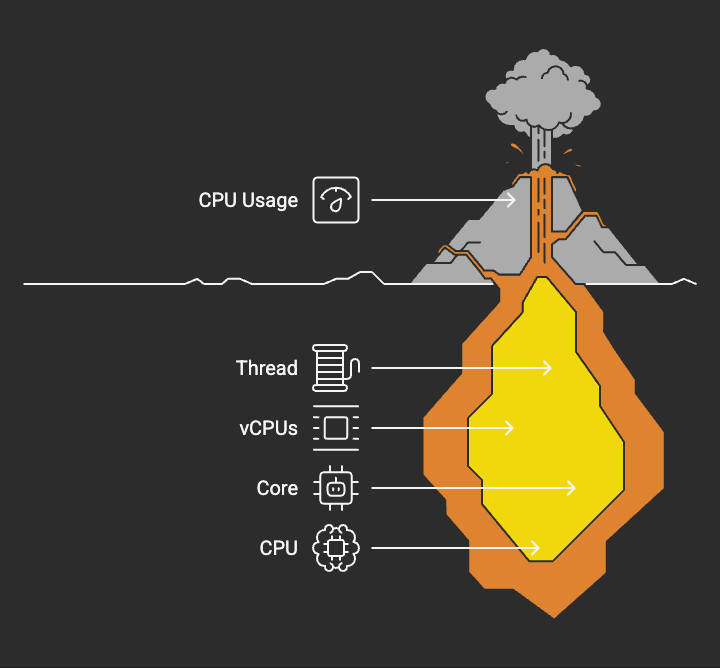
🧠 Cores, Threads, and vCPUs: The Untold Story of CPUs in Linux, Docker, and Kubernetes
“I gave my Docker container 2 CPUs — why is it still slow?”
“Why does Kubernetes use millicores instead of cores?”
“Why does htop show 8 CPUs when my laptop has 4?”
Welcome to the chaos.
Most developers have a vague sense that CPUs are “doing work” — somewhere down there, deep in the machine. But when it comes time to set CPU limits on Docker containers or request compute in Kubernetes clusters, that vagueness becomes a real liability.
If you want to level up as a software engineer, platform engineer, or backend specialist — you need CPU literacy.
This blog will demystify CPUs from the bare metal up — from physical cores and hyperthreading, to virtual CPUs, millicores, and how Linux, Docker, and Kubernetes interpret them.
🟩 1. The Developer’s Dilemma: How Many CPUs Do You Really Have?
Let’s say you’re on a Linux system and you run:
$ lscpu | grep "^CPU(s):"CPU(s): 8
Looks like you’ve got 8 CPUs. But does that mean 8 physical processors? 8 cores? Or something else?
Let’s break this down before we start throwing around terms like vCPU, millicore, and CPU-quota.
🟨 2. The Physical Reality: CPU, Core, Thread
🔧 CPU (Central Processing Unit)
The brain of the computer. It executes machine instructions.
🧩 Core
A single compute unit inside a CPU. Think of it as a miniature processor within the processor.
- Adual-core CPUhas 2 cores.
- Aquad-core CPUhas 4 cores.
- Each core can (usually) run one instruction stream (thread) at a time.
🧵 Hyperthreading
Intel’s marketing name forSimultaneous Multithreading (SMT).
- Each core presentstwological execution contexts (called threads).
- One core = 2logical CPUsto the OS.
Thus, your 4-core laptop with hyperthreading shows up as:
8 CPUsin Linux.
That’s not a lie — it’s ascheduler trick.
🧠 Linux View:
$ nproc8$ lscpu | grep "Thread|Core|Socket"Thread(s) per core: 2Core(s) per socket: 4Socket(s): 1
So now you know:8 logical CPUs = 4 physical cores × 2 hyperthreads.
🧠 Visual Example: Single Socket System
Example: Intel Xeon with 1 socket, 4 cores, Hyper-Threading enabled
Socket 0
├── Core 0
│   ├── Logical CPU 0
│   └── Logical CPU 1
├── Core 1
│   ├── Logical CPU 2
│   └── Logical CPU 3
├── Core 2
│   ├── Logical CPU 4
│   └── Logical CPU 5
└── Core 3
    ├── Logical CPU 6
    └── Logical CPU 7
🟦 3. vCPU: The Illusion of Compute
☁️ What is a vCPU?
AvCPU (virtual CPU)is the compute unit exposed by virtualization technologies like:
- VMware
- Hyper-V
- KVM (used by cloud providers like AWS/GCP)
Rule of thumb:
1 vCPU = 1 hyperthread = ½ physical core
In cloud platforms like AWS EC2 or GCP, when they say “2 vCPUs”, you’re usually getting2 hyperthreads, possibly on the same physical core.
That means:
- You’re sharing the silicon with another user
- You’re time-sliced and isolated by the hypervisor
🟧 4. Docker CPU Limits: The Cgroups Game
Let’s say you run:
docker run --cpus=2 my-app
What happens?
You’re not “getting” 2 CPUs. You’re telling Linux to usecgroupstothrottlethis container’s CPUtime slice.
Under the hood:
cpu.cfs_quota_us = 200000cpu.cfs_period_us = 100000
→ This tells the Linux scheduler:
This container can use up to 200ms of CPU time per 100ms period — i.e., 2 cores worth.
Want to pin containers to specific cores?
docker run --cpuset-cpus="0,1" ...
That’s hard binding — the container can only run on CPU 0 and 1.
💡Key Insight: CPU quotas limithow much, notwherethe process runs.
🟪 5. Kubernetes: Millicores and Scheduling Realities
In Kubernetes, CPU limits and requests are expressed inmillicores.
1000m = 1 vCPU = 1 logical core
So this:
resources: requests: cpu: "500m"
Means:
“Please schedule me on a node where I can get at least50% of one CPU’s time.”
Kubernetes doesn’t slice physical cores. It usescgroupsand theLinux Completely Fair Scheduler (CFS)tothrottle CPU usagebased on time.
That’s why:
- CPU limits protect the node from noisy neighbors
- CPUrequestshelp the scheduler make bin-packing decisions
But — and this is important —there’s no hard CPU isolation unless you use CPU pinning(via static CPU Manager policies).
🎯 Millicore ≠ Microprocessor
It’s aunit of time, not hardware. Think in terms ofquota, notchip.
🟥 6. How CPUs Actually Run Threads
Most developers think threads are executed by cores directly.
Wrong.
Here’s the reality:
- Your Java app creates 10 threads.
- The OS scheduler decides which thread gets time on which core.
- Context switching occurs at nanosecond precision.
- Two threads might beinterleavedon the same core, ormigratedacross cores.
🔄 Concurrency vs Parallelism
- Concurrency: Multiple tasksin progress(via context switching)
- Parallelism: Multiple tasksexecuting simultaneously(requires multiple cores)
Example:
- Your 4-core machine runs 40 threads → concurrent, not fully parallel.
- 4 cores can onlytrulyrun 4 threads at a time.
Everything else isillusion + scheduler magic.
🟫 7. Real-World Scenarios: Now You Know
🧪Your container is slow, even with 2 CPUs?
→ You’re CPU throttled. Check cpu-quota. You’re likely using 2 cores’ worth oftime, not dedicated compute.
🧪Your K8s pod is crashing under load?
→ You hit your CPUlimit, and the OS started throttling or evicting your pod.
🧪top shows 100% CPU for your process?
→ That’s 1 full logical core’s worth of time. On a 4-core, 8-thread system, that’s12.5% of total machine capacity.
🟩 8. Closing Thoughts: CPU Literacy Is Dev Maturity
Whether you’re shipping containerized microservices or debugging JVM threads in production —understanding CPUs is leverage.
It helps you:
- Avoid overprovisioning or underprovisioning compute
- Diagnose performance issues accurately
- Speak confidently in system design interviews
Next time someone says “give the container 1 CPU”, ask:
“Do you mean onephysical core, onehyperthread, or1 vCPU’s worth of time?”
Because now, you know the difference.
🔖 Further Reading & Tools
- lscpu— Check system CPU info
- htop— Interactive CPU and process monitor
- taskset— Pin process to CPU cores
- cgroups— Resource limits in Linux
- kubectl top— View CPU usage in Kubernetes
🛠️ Show Your Support
If this post brought you clarity, saved you hours of Googling, or challenged the way you think:
- 👏Clapto support the effort (you can hit it up to 50 times on Medium).
- 🔁Shareit with a fellow engineer or curious mind.
- 💬Commentwith questions, feedback, or requests — I read every one.
- 📩Requesta topic you’d like covered next.
- ⭐Followto stay ahead as new deep-dive posts drop.
Let’s build real engineering wisdom — not trivia.