🚀 Maven for Java Developers: A Practical Deep Dive
For any serious Java developer — especially one working with Spring Boot — understanding Maven is non negotiable. Maven is more than just a build tool; it’s ...
🚀 Maven for Java Developers: A Practical Deep Dive
For any serious Java developer — especially one working with Spring Boot — understanding Maven is non-negotiable. Maven is more than just a build tool; it’s a project management and automation framework that defines how software is built, tested, packaged, and deployed.
This blog explains what Maven is, why it matters, how it works internally, and how it integrates with Spring Boot. By the end, you’ll have a solid understanding of its lifecycle, phases, goals, and behavior in your development environment.
🧰 What Is Maven?
Maven is a powerful build automation and dependency management tool for Java-based projects. It uses apom.xmlfile (Project Object Model) to declare the project structure, dependencies, plugins, and configuration. Maven promotes standardization and reproducibility across development teams and environments.
❓ Why Do We Need Maven?
Modern Java applications often rely on numerous libraries and frameworks. Managing those dependencies manually is time-consuming and error-prone. Maven solves this by:
- 📦 Resolving dependencies automatically from central repositories
- 🔄 Defining a consistent lifecycle for building and testing
- 🤖 Automating packaging and deployment
- 🔗 Enabling easy integration with CI/CD systems
Maven improves efficiency, reduces human error, and brings consistency to builds.
🛠️ Can a Java Application Exist Without Build Tools?
Yes, in theory. A developer can write.javafiles, compile them usingjavac, manually package them into JARs, and run them usingjava. However, in a modern, multi-dependency project, this quickly becomes unsustainable.
Without build tools, you would be responsible for:
- 🧮 Manually resolving and maintaining classpaths
- 🔁 Recompiling the entire application for every change
- 📝 Writing your own scripts to test, build, and deploy
This is inefficient and error-prone. Maven abstracts and automates this process.
🔄 Maven Lifecycle: How It All Fits Together
Maven’s build process is defined throughlifecycles,phases, andgoals.
🔧 Maven Lifecycles
Maven provides three standard lifecycles:
- default— Handles the core build process (compilation, testing, packaging)
- clean— Deletes previous build outputs
- site— Generates project documentation
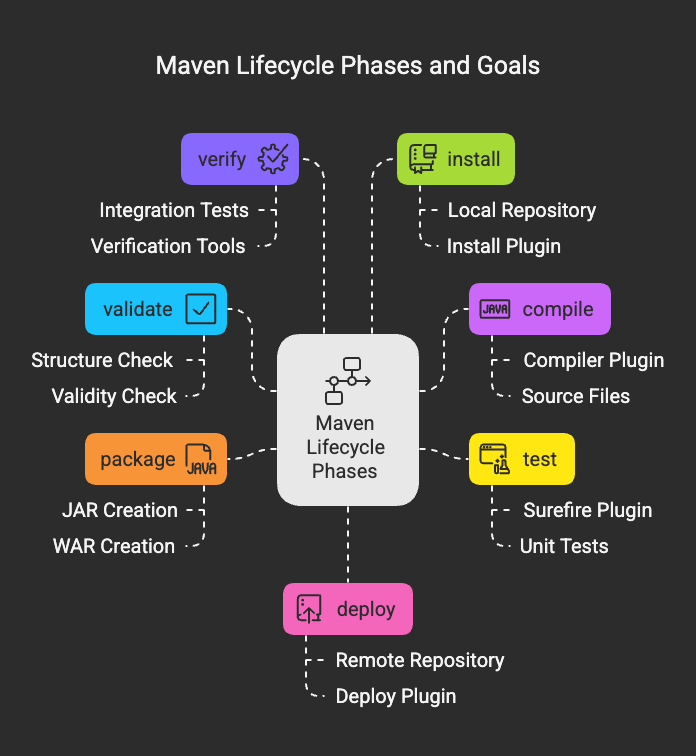
Each lifecycle contains a sequence ofphases. You don’t execute goals directly in most cases; you trigger a phase, and Maven internally executes all goals bound to that phase and all phases that come before it.
📚 Maven Phases and Default Goals (Simplified Overview)
Here’s how Maven’s core lifecycle phases typically map to default plugin goals:
validate— ✅ Checks the project’s structure and validitycompile— 🛠️ Compiles main Java source files (compiler:compile)test— 🧪 Compiles and runs unit tests (surefire:test)package— 📦 Bundles the code into a JAR/WAR (jar:jarorwar:war)verify— 🔍 Runs additional verification (e.g., integration tests)install— 💾 Installs the artifact into the local Maven repository (install:install)deploy— 📤 Uploads the artifact to a remote repository (deploy:deploy)
You can also run plugin goals explicitly:
mvn compiler:compilemvn surefire:test
⚙️ Custom Goals and Plugin Use
Maven is extendable via plugins. Most real-world builds involve plugins like:
spring-boot-maven-pluginfrontend-maven-pluginexec-maven-plugin
You can configure custom goals in yourpom.xml, attach them to specific phases, or run them manually.
🌱 The Spring Boot Maven Plugin
Spring Boot offers its own Maven plugin to simplify common operations. It integrates deeply with the Maven lifecycle:
spring-boot:run— ▶️ Starts the application using the Maven build contextspring-boot:repackage— 🔄 Creates an executable JAR with embedded server
The repackage goal is automatically bound to thepackagephase. This means you can simply run:
mvn clean packagejava -jar target/myapp.jar
Or, during development:
mvn spring-boot:run
🧩 Maven vs mvn vs mvnw
- Maven🧱 is the entire build system.
mvn💻 is the CLI tool used to run Maven commands.mvnw🔒 is the Maven Wrapper—a script added to your project that ensures a specific Maven version is used across all environments.
Usemvnwin projects to avoid “it works on my machine” issues.
🧠 IntelliJ and Maven: What Happens When You Run a Project
When you click “Run” in IntelliJ:
- 🕵️ IntelliJ checks the run configuration (defined under
Run → Edit Configurations) - 🧪 If Maven is configured, it may invoke
spring-boot:run,compile, or other goals - 🧰 Otherwise, IntelliJ compiles the code using its internal compiler and runs it via
java -jar
This means IntelliJcanbypass Maven if explicitly configured to do so, but in Maven-managed projects, it typically uses Maven under the hood.
✅ Conclusion
Maven remains a cornerstone of modern Java development. Its structured lifecycle, powerful plugin ecosystem, and deep integration with IDEs make it indispensable.
For Spring Boot applications, Maven simplifies dependency resolution, build orchestration, and packaging into executable JARs. Understanding what happens behind the scenes — especially in tools like IntelliJ — can help you debug faster and build more confidently.
Stay consistent. Automate everything. Use Maven wisely.