Spring Boot Is Slow — ⚡Until You Do These 10 Things
You’re building with Spring Boot — but is your app truly optimized, or merely functional?
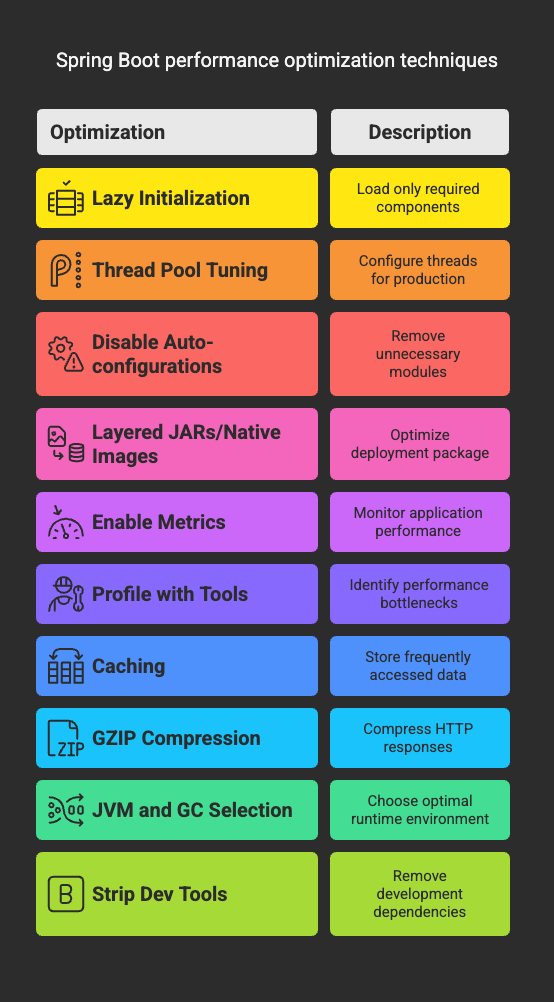
Spring Boot Is Slow — ⚡Until You Do These 10 Things
You’re building with Spring Boot — but is your app truly optimized, or merely functional?
Spring Boot gives you a fast start. But fast isn’t the same ashigh-performance. If you’re shipping to prod without tuning these knobs, you’re leaving performance, scalability, and efficiency on the table.
This is your no-nonsense, production-grade blueprint to boost your Spring Boot performance — built from the trenches of JVM engineering, cloud deployments, and battle-tested systems. No fluff. Just the battle plan.
🔥 1. Switch to Lazy Initialization — Load Only What You Need
By default, Spring Boot eagerly initializes all beans at startup. That’s fine for toy apps. But in production, this is wasted CPU and memory on day zero.
Fix it:
spring: main: lazy-initialization: true
Deep dive:Lazy initialization doesn’t defer bean creation forever. It instantiates beansonly when needed. This means your@RestController, for example, won’t be initialized until the first HTTP request comes in.
Why it matters:
- Faster cold starts (especially in containers, serverless, or CI tests)
- Reduced memory footprint
- More responsive CI/CD pipelines
⚙️ 2. Tune Thread Pools — Default Threads Are Meant for Demos
Executors power everything async in Spring — from@Asyncmethods to internal servlet handling. But the defaults? Absolutely not optimized.
Fix it:
Create a tunedThreadPoolTaskExecutorbean:
@Beanpublic TaskExecutor taskExecutor() { ThreadPoolTaskExecutor executor = new ThreadPoolTaskExecutor(); executor.setCorePoolSize(8); executor.setMaxPoolSize(16); executor.setQueueCapacity(500); executor.setThreadNamePrefix("app-task-"); executor.initialize(); return executor;}
Analogy:Think of this like tuning the number of workers in a restaurant kitchen. Too few, and orders pile up. Too many, and you waste resources. The default kitchen has one lazy cook.
Why it matters:
- Prevents request queuing under load
- Maximizes CPU utilization on multi-core systems
- Avoids
RejectedExecutionExceptionduring traffic spikes
🚫 3. Disable Unused Auto-configurations — Cut the Fat
Spring Boot ships with a Swiss army knife of features. Most aren’t needed. If you’re not using security, JMX, or JPA, why load their beans?
Fix it:
Use exclusions via annotations:
@SpringBootApplication(exclude = { DataSourceAutoConfiguration.class, SecurityAutoConfiguration.class})
Or go deeper usingMETA-INF/spring.factoriesoverrides.
Why it matters:
- Shorter startup time
- Less memory use
- Smaller runtime surface = fewer bugs
📦 4. Use Layered JARs or Native Images — Build to Deploy, Not Just Run
The default fat JAR is convenient, but it bundles all your dependencies with app code into one giant blob.
Fix it:
Use Spring Boot’s layered JAR support or build native binaries:
mvn spring-boot:build-image
Or compile to native with GraalVM:
native-image -jar app.jar
Why it matters:
- Layered JARs enable Docker cache reuse = faster CI/CD
- Native images give sub-100ms startup and minimal memory use
🔍 5. Enable Metrics — Then Actually Look at Them
The Actuator gives you metrics — but only if you expose them.
Fix it:
management: endpoints: web: exposure: include: health, metrics, prometheus
Then plug into Prometheus and Grafana.
Why it matters:
- Track GC pauses, heap pressure, thread deadlocks
- Alert before things break
- Compare deployments empirically
Pro tip:Monitor your thread pools. They’re the canaries in your JVM coal mine.
📊 6. Profile with Real Tools — Intuition Isn’t Enough
You can’t optimize what you don’t measure.
Tools to master:
- VisualVM (for memory and GC)
- JFR (Java Flight Recorder)
- async-profiler (native-level CPU profiling)
Look for:
- GC frequency & pause times
- Lock contention hotspots
- CPU hogs
Why it matters:
Performance isn’t just about faster code. It’s about removing bottlenecks. Profiling reveals where your appactuallyspends its time.
🧠 7. Cache Everything That Hurts
If a method is slow and called often, cache it. It’s that simple.
Fix it:Use Spring’s caching abstraction with Caffeine or Redis.
@Cacheable("products")public Product getProductById(String id) { simulateHeavyQuery(); return repo.findById(id);}
Real-world tip:Profile first. Cache later. Don’t cache blindly.
Why it matters:
- Lowers DB load
- Reduces request latency
- Gives free wins on repeat traffic
💨 8. Enable GZIP Compression — Speed Isn’t Just Backend
Sending raw JSON over the wire is inefficient. Compression saves time and bandwidth.
Fix it:
server: compression: enabled: true mime-types: application/json,text/html,text/plain min-response-size: 1024
Why it matters:
- Cuts response sizes by 70–90%
- Improves perceived performance
- Helps on mobile and slow networks
🧪 9. Use the Right JVM and GC
Not all JDK builds are equal. Azul Zulu, GraalVM CE, and Oracle’s LTS builds all have tradeoffs.
Fix it:
- Use JDK 17 or newer (LTS)
- Pick a GC that suits your workload: G1GC, ZGC, Shenandoah
- Profile with
-XX:+PrintGCDetails
Why it matters:
Newer JVMs give you better JIT, less memory churn, and smarter garbage collectors.
🧼 10. Strip Dev Tools from Production Builds
Spring DevTools, H2, Swagger UI, and debug flags are fordevelopment. Leave them out in prod.
Fix it:
spring: devtools: restart: enabled: false
Or exclude the dependency completely using profiles.
Why it matters:
- Smaller attack surface
- Less memory use
- Fewer surprises in production
In Closing
Spring Boot gives you speed. But production demandsperformance.
Every improvement above is based on real-world, high-throughput JVM systems — designed by engineers who have lived through latency issues, OOMs, GC chaos, and 3 a.m. outages.
You now have the blueprint. What you do next is up to you.
📌P.S.Want to level up your engineering game? Subscribe on Medium. I write battle-tested backend engineering guides, not just theory.
📎Checkout:Concurrency & Multithreading: The Ultimate Engineer’s Bible